
Home › Blog › Best IPTV for Live TV in 2026 — What to Look For
Best IPTV for Live TV in 2026 — What to Look For
April 3, 2026
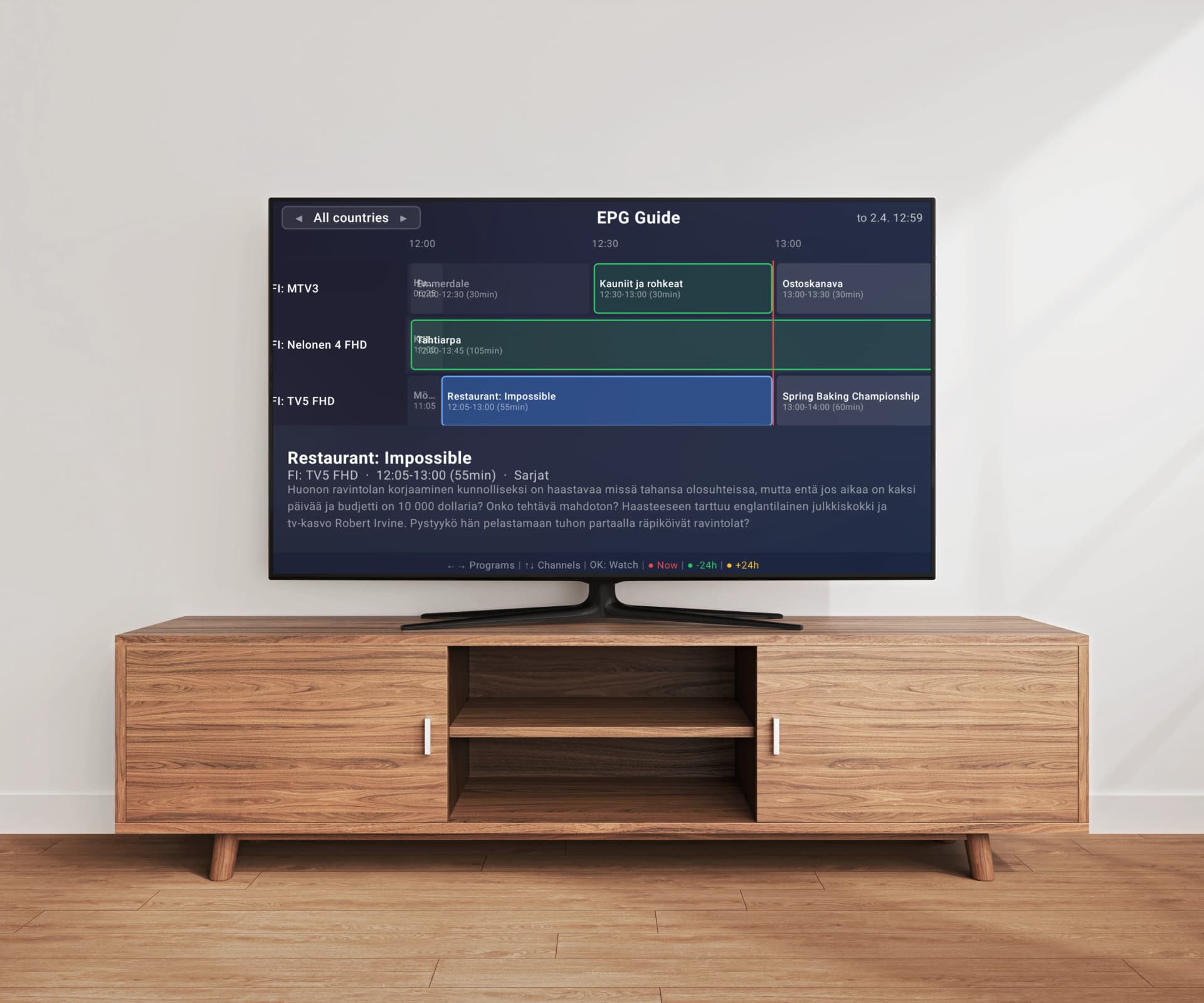
Watching live TV through IPTV is fundamentally different from on-demand streaming. When you are watching a live football match or following breaking news, every second of buffering matters, channel switching needs to feel instant, and a reliable Electronic Program Guide (EPG) becomes essential for navigating hundreds or thousands of channels. Not all IPTV players handle live TV equally well. Some excel at on-demand playback but struggle with live streams, while others are built from the ground up for the live TV experience. In this guide, we explain what features matter most for live TV viewing, why some players handle it better than others, and how Easy IP TV's server-side approach was designed specifically for the demands of live television.
What Makes a Great Live TV IPTV Player?
A great live TV IPTV player needs to excel in several areas that do not matter as much for on-demand viewing. First, channel switching speed is critical — when you are flipping between channels during live events, a player that takes 5 seconds to load each channel creates a frustrating experience. Second, EPG support must be reliable and comprehensive, automatically matching program data to your channels so you can see what is playing at a glance. Third, the player needs to handle live stream interruptions gracefully — network hiccups happen, and a good player reconnects quickly without crashing. Fourth, it must work well with very large playlists, since live TV users often have thousands of channels and need to navigate them efficiently through search, favorites, and category filtering.
Why EPG Quality Makes or Breaks Live TV
The Electronic Program Guide is arguably the single most important feature for live TV viewing. Without EPG, you are reduced to scrolling through a numbered channel list with no idea what is on — an experience far worse than traditional cable TV. A well-implemented EPG shows what is currently playing on each channel, what is coming up next, and lets you quickly scan across multiple channels at once. The challenge is that EPG data comes from XMLTV files that can be hundreds of megabytes in size. Players that process this data on the TV itself often struggle with slow loading times, incomplete channel matching, and memory issues. Easy IP TV takes a different approach: it detects your EPG data automatically from the url-tvg header in your M3U playlist and processes the entire XMLTV file on our servers. Your TV receives only the relevant, optimized program data — so the guide loads instantly and matches more channels accurately, even for playlists with over 200,000 channels.
Channel Switching Speed — The Live TV Dealbreaker
Channel switching speed might not matter when you are binge-watching a series, but it makes or breaks the live TV experience. Traditional cable and satellite TV switch channels almost instantly — IPTV has to compete with that expectation. The delay you experience when switching IPTV channels comes from several sources: the player needs to stop the current stream, request the new stream URL, connect to the server, buffer enough data to start playback, and render the first frame. A well-optimized player minimizes each of these steps. Players that run heavy processing on the TV — like parsing large M3U files or matching EPG data in real-time — have less CPU and memory available for fast stream switching. By offloading playlist and EPG processing to the server, Easy IP TV keeps your TV's resources free for what matters most during live viewing: fast, smooth channel switching.
Handling Large Playlists for Live TV
Live TV users frequently work with large playlists — it is not uncommon to have 5,000, 20,000, or even 200,000 channels from an IPTV provider. How a player handles these large playlists directly impacts your live TV experience. Players that parse and index the entire playlist on the TV can take minutes to load and may cause the app to run sluggishly. Search and filtering become slow, channel group navigation becomes laggy, and the overall experience degrades significantly. Server-side playlist processing eliminates this bottleneck by doing all the heavy work off-device. Easy IP TV processes your M3U playlist on our servers — parsing channel data, extracting groups, downloading logos, and matching EPG — so your TV only needs to display the already-organized results. This approach is what allows Easy IP TV to handle playlists with over 200,000 channels while still loading quickly and switching channels smoothly on even older Smart TVs.
Platform Availability — Where Can You Watch?
Your choice of IPTV player depends heavily on which TV you own. The three major Smart TV platforms — Samsung Tizen, LG webOS, and Android TV / Google TV — each have different app ecosystems with varying IPTV player availability. Android TV generally has the widest selection of IPTV players available through the Google Play Store. Samsung and LG Smart TVs have historically had fewer options, with some previously popular apps having been removed from official app stores. Easy IP TV is available natively on all three major platforms, with dedicated apps in Samsung Apps, LG Content Store, and Google Play Store. This means you get the same live TV experience regardless of which TV brand you own, and you do not need to sideload or install from unknown sources.
Stream Stability and Error Recovery
Live TV streams are inherently less stable than on-demand content. An on-demand video is served from a global CDN with multiple redundant servers, while a live IPTV stream often comes from a single source server that handles many concurrent viewers. Stream drops, buffering, and connection interruptions are a reality of live IPTV. What separates a good live TV player from a poor one is how it handles these interruptions. The best players detect stream drops instantly and attempt automatic reconnection without user intervention. They also manage buffer sizes intelligently — too small a buffer causes frequent stuttering, while too large a buffer introduces unacceptable delay for live content where real-time viewing matters. Look for players that provide clear error messages when streams fail rather than simply showing a black screen, so you can distinguish between a player issue and a source issue.
Favorites, Groups, and Quick Navigation
When you have thousands of live channels, organization is everything. A good live TV IPTV player offers robust channel management features that let you quickly find what you want to watch. Channel groups — which come from your M3U playlist categories — let you browse by genre, country, or content type. A favorites system lets you pin your most-watched channels for instant access. Search functionality that filters as you type helps you find specific channels in a list of thousands. Easy IP TV reads channel groups directly from your M3U playlist and displays them as navigable categories on your TV. Combined with the search function and channel number display, you can navigate even the largest playlists efficiently — which is essential for a satisfying live TV experience where you might switch between dozens of channels in a single viewing session.
How Easy IP TV Is Built for Live TV
Easy IP TV was designed from the ground up with live TV as the primary use case. The server-side processing approach solves the two biggest pain points of live TV IPTV: slow EPG loading and sluggish performance with large playlists. When you add your M3U playlist URL, our servers download and process the playlist — parsing channels, extracting groups, downloading logos, and matching EPG data from your XMLTV source. Your TV receives only the optimized, ready-to-display data. The result is fast channel switching, instant EPG display, and smooth navigation even with playlists containing hundreds of thousands of channels. Automatic EPG detection means you do not have to manually configure anything — if your M3U file includes a valid EPG URL, the program guide just works. Native apps for Samsung, LG, and Android TV ensure a consistent experience across platforms. Start with the free 24-hour trial to test it with your own playlist before committing.
FAQ
What should I look for in an IPTV player for live TV?
The most important features for live TV are: reliable EPG (Electronic Program Guide) that shows what is playing on each channel, fast channel switching speed, ability to handle large playlists without lag, and stable stream playback with automatic reconnection on network hiccups. Server-side playlist and EPG processing is a significant advantage because it keeps your TV's limited hardware resources free for smooth playback and fast navigation.
Why does EPG matter so much for live TV?
Without EPG, watching live IPTV is like flipping through channels blindly — you have no idea what is playing until you switch to each channel and wait for it to load. EPG shows you the current program, upcoming schedule, and program details across all your channels at once. For large playlists with thousands of channels, EPG is essential for finding content efficiently. Easy IP TV detects your EPG automatically from the M3U playlist and processes it server-side, so the program guide appears without manual configuration.
Can I watch live TV on my Smart TV with IPTV?
Yes. With an IPTV player app like Easy IP TV and an M3U playlist from your IPTV provider, you can watch live TV channels directly on your Samsung, LG, or Android Smart TV. Install the app from your TV's app store, link your TV at easy-ip.tv, paste your M3U playlist URL, and your live channels appear with an electronic program guide. No additional hardware or set-top box is needed.
Why does my IPTV buffer during live TV?
Live TV buffering is usually caused by the stream source rather than the player app. Common fixes include using a wired Ethernet connection instead of Wi-Fi, ensuring at least 10 Mbps internet speed for HD streams, changing your DNS to Google (8.8.8.8) or Cloudflare (1.1.1.1), and closing other apps on your TV. If specific channels buffer while others play smoothly, the issue is with those particular stream sources. Some ISPs also throttle IPTV traffic, in which case a VPN at the router level may help.
Is IPTV better than cable for live TV?
IPTV offers several advantages over traditional cable for live TV: a much wider channel selection (often thousands of channels from around the world), lower cost, no long-term contracts, and the flexibility to watch on any Smart TV or device. However, cable TV generally offers more consistent stream quality and instant channel switching. Modern IPTV players have narrowed the gap significantly with fast channel switching, automatic EPG, and reliable performance — making IPTV a compelling alternative for most live TV viewers.
Do I need a separate device for IPTV live TV?
No. Modern Smart TVs from Samsung, LG, and Android TV brands can run IPTV player apps directly — no external box, stick, or receiver needed. Just download an IPTV player like Easy IP TV from your TV's built-in app store and add your playlist. If you have an older TV that does not support IPTV apps, affordable streaming devices like Amazon Fire TV Stick, Chromecast with Google TV, or NVIDIA Shield can add the capability.
Related articles
Best IPTV Player for Smart TV 2026 — Which One Fits Your TV?
Which is the best IPTV player for Smart TV in 2026? We compare the top apps for Samsung, LG, and Android TV — and show which IPTV app is the right match for your television.
IPTV EPG Guide: Setup, XMLTV & Troubleshooting
Everything you need to know about Electronic Program Guides for IPTV. From understanding XMLTV format to fixing common EPG problems, this guide covers setup, troubleshooting, and why server-side EPG matching delivers a better experience.
Best IPTV Player for Android TV & Google TV 2026
Which is the best IPTV player for Android TV in 2026? We compare the top 5 IPTV apps for Android TV and Google TV — Easy IP TV, TiviMate, IPTV Smarters Pro, OTT Navigator, and SmartOne IPTV — to help you find the right app for your TV.
What is IPTV? Complete Beginner's Guide (2026)
IPTV has transformed how millions of people watch television, but the technology and terminology can be confusing for newcomers. This comprehensive guide explains everything you need to know about IPTV in plain language — from how the technology works to how to set it up on your own TV.
Try Easy IP TV for Live TV
Fast channel switching, automatic EPG, and smooth performance with even the largest playlists. Available on Samsung, LG, and Android TV — start with a free 24-hour trial, no credit card required.
Start Free Trial