
Home › Blog › Best IPTV Player for Samsung TV in 2026
Best IPTV Player for Samsung TV in 2026
March 26, 2026
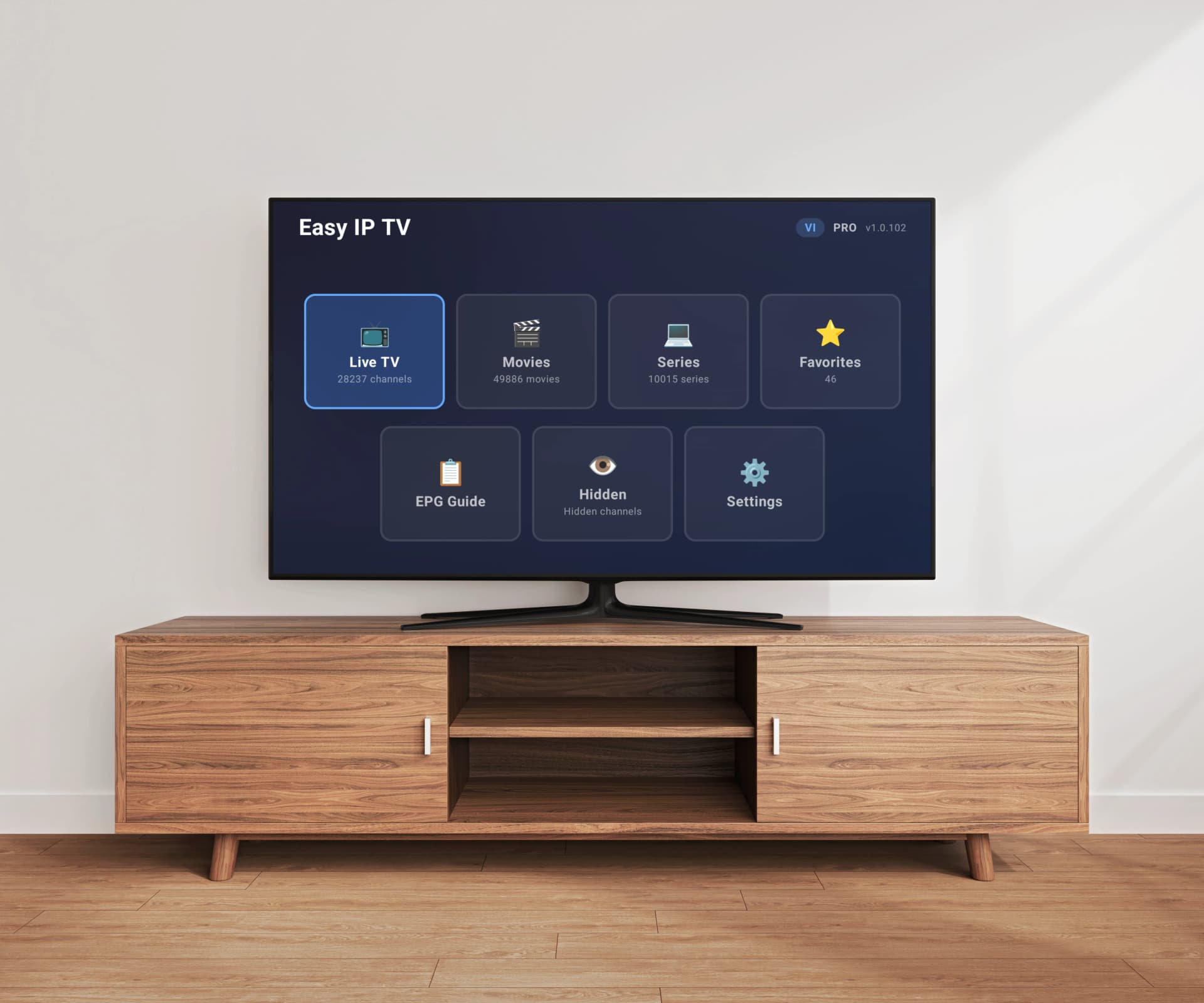
Samsung Smart TVs running Tizen OS are the most popular TVs worldwide, and finding the right IPTV player to watch your M3U playlist on one can make or break your viewing experience. Not all IPTV apps are created equal — some process playlists on the TV itself (causing lag on large playlists), others require sideloading, and pricing models vary from one-time fees to monthly subscriptions. In this comprehensive comparison, we look at the five best IPTV players available for Samsung TVs in 2026 and help you choose the right one.
Top 5 IPTV Players for Samsung TV
1. Easy IP TV
Easy IP TV is a purpose-built IPTV player for Smart TVs that takes a unique approach: your M3U playlist is processed on the server rather than on your TV. This means even playlists with 10,000+ channels load quickly without taxing your Samsung TV's limited hardware. The app is available natively on Samsung Tizen (2018+), LG webOS, and Android TV — making it one of the few players that works across all three major Smart TV platforms. Setup takes under 2 minutes: install from Samsung Apps, link your TV with a 6-digit code or QR code, paste your M3U URL on the website, and your channels appear on the TV.
Pros
- Server-side M3U processing eliminates TV lag
- Native Samsung Tizen app (no sideloading)
- EPG support with automatic detection
- Instant search across thousands of channels
- Works across Samsung, LG, and Android TV with one account
- Favorites and hidden channels
- Free 24-hour trial with no credit card required
Cons
- Monthly subscription model (no lifetime option)
- No Xtream Codes API support — M3U URLs only
- Relatively new compared to established competitors
Price: Free 24h trial, then Basic (1 TV) or Pro (up to 3 TVs) monthly subscription
2. SmartOne IPTV
SmartOne IPTV is a well-established IPTV player available on Samsung, LG, VIDAA, Android TV, and Fire TV. It supports both M3U playlists and Xtream Codes API connections, giving users flexibility in how they connect to their IPTV provider. The app also integrates with TMDb for movie and series metadata, which is a nice touch for VOD content. SmartOne processes playlists locally on the TV, which can be slower with very large channel lists.
Pros
- Supports both M3U and Xtream Codes API
- TMDb integration for movie/series info
- Available on many platforms including VIDAA and Fire TV
- One-time payment model
Cons
- Higher one-time price (~€12–14)
- Playlist processing happens on the TV, which can lag with large lists
- Interface can feel cluttered with many settings
Price: Approximately €12–14 one-time purchase
3. IBO Player
IBO Player is a popular IPTV player available on Samsung, LG, and Android TVs. It supports Xtream Codes API connections and M3U playlists. IBO Player is known for its clean interface and solid reliability. It uses a very affordable pricing model with a yearly or lifetime fee, making it attractive for budget-conscious users.
Pros
- Very affordable pricing (€5/year or €10 lifetime)
- Supports Xtream Codes API
- Clean, functional interface
- Available on Samsung, LG, and Android
Cons
- Playlist processing is done on the TV
- No server-side optimization for large playlists
- Limited cross-platform account features
Price: €5/year or €10 lifetime
4. Smart IPTV (SIPTV)
Smart IPTV, often called SIPTV, is one of the oldest IPTV players for Samsung TVs. It uses a simple approach: you upload your M3U playlist via the Smart IPTV website using your TV's MAC address, and channels appear on the TV. While it was once the go-to option, the app has not evolved significantly and its interface feels dated compared to newer alternatives. It charges a one-time fee per device.
Pros
- Simple, straightforward setup
- One-time payment
- Long track record — been around for years
- Lightweight and stable
Cons
- Dated interface with minimal features
- No EPG or limited EPG support
- Per-device payment (€5.49 each TV)
- No search functionality
- No server-side processing
Price: €5.49 one-time per device
5. IPTV Smarters Pro
IPTV Smarters Pro is one of the most downloaded IPTV apps globally with over 10 million installs across platforms. It supports Xtream Codes API, M3U playlists, and offers features like multi-screen viewing and catch-up TV. While it's primarily designed for Android and iOS, versions are available for some Smart TV platforms. On Samsung, availability can vary by region and model.
Pros
- Massive user base (10M+ downloads)
- Supports Xtream Codes API and M3U
- Multi-screen and catch-up features
- Free tier available
Cons
- Samsung Tizen availability is inconsistent
- Primarily a mobile app adapted for TV
- Interface is not optimized for TV remote navigation
- Can be laggy with large playlists
Price: Free with ads, Pro version varies by platform
What to Look for in a Samsung TV IPTV Player
Before choosing an IPTV player for your Samsung TV, consider these key factors: Native Tizen support (apps from Samsung Apps store perform best), M3U playlist handling (can it handle large playlists without lag?), EPG support (does it show program guides?), search functionality (essential with thousands of channels), and pricing model (one-time vs. subscription). The most important technical factor is how the app processes your playlist — on the TV or on a server.
Why Server-Side Processing Matters on Samsung TV
Samsung Tizen TVs, even recent models, have limited RAM and processing power compared to a phone or computer. When a traditional IPTV player loads a large M3U playlist (5,000–200,000 channels), it must parse the entire file on the TV. This causes slow loading, interface lag, and sometimes crashes. Easy IP TV solves this by processing the playlist on its servers and sending only the optimized channel data to your TV. The result is consistent performance regardless of playlist size — whether you have 500 channels or 50,000.
M3U vs. Xtream Codes: Which Do You Need?
Some IPTV providers offer both M3U URLs and Xtream Codes API credentials. M3U is the universal format — every IPTV player supports it. Xtream Codes is a proprietary API that some apps like SmartOne IPTV, IBO Player, and IPTV Smarters Pro support in addition to M3U. If your provider gives you an M3U URL, any player on this list will work. If you specifically need Xtream Codes, check that the app supports it — Easy IP TV and Smart IPTV currently support M3U only.
EPG and Channel Management Compared
EPG (Electronic Program Guide) shows what's currently playing and what's coming up on each channel. Easy IP TV automatically detects EPG data from your M3U playlist and also lets you add a separate XMLTV EPG URL. SmartOne IPTV and IBO Player also offer EPG support. Smart IPTV has limited EPG capabilities. For channel management, Easy IP TV offers favorites, hidden channels, and instant search. Most competitors offer favorites but lack instant search across the full channel list.
Pricing Comparison at a Glance
Pricing models vary significantly. Smart IPTV charges €5.49 per device one-time. IBO Player offers the lowest entry at €5/year or €10 lifetime. SmartOne IPTV costs around €12–14 one-time. Easy IP TV uses a monthly subscription model (Basic for 1 TV, Pro for up to 3 TVs) with a free 24-hour trial. The best value depends on your usage — if you switch apps frequently, a free trial lets you test before committing. If you want the cheapest long-term cost and don't need advanced features, a one-time purchase may be better.
How to Install Easy IP TV on Samsung TV
Installation takes under 2 minutes: 1) Press the Home button on your Samsung remote. 2) Open Samsung Apps (or the Apps section). 3) Search for "Easy IP TV" and install it. 4) Open the app — a 6-digit code and QR code appear on screen. 5) On your phone or computer, visit easy-ip.tv and enter the code (or scan the QR code). 6) Paste your M3U playlist URL in the dashboard and save. Your channels will appear on your TV within moments. Works on all Samsung Smart TVs from 2018 onwards.
Our Recommendation
For most Samsung TV users, Easy IP TV offers the best combination of performance, usability, and features thanks to its server-side processing approach. If you need Xtream Codes support and prefer a one-time payment, SmartOne IPTV or IBO Player are solid alternatives. Smart IPTV is fine for basic needs but feels outdated. IPTV Smarters Pro is best suited for Android devices where it runs natively. We recommend trying Easy IP TV's free 24-hour trial to see if it fits your needs — no credit card required.
Comparison Table
Easy IP TV: Samsung, LG, Android TV | Monthly subscription | Server-side processing | EPG | Search | Free trial. SmartOne IPTV: Samsung, LG, VIDAA, Android TV, Fire TV | ~€12–14 one-time | TV-side processing | EPG | Xtream Codes. IBO Player: Samsung, LG, Android | €5/yr or €10 lifetime | TV-side processing | EPG | Xtream Codes. Smart IPTV: Samsung, LG, Fire TV | €5.49/device | TV-side processing | Limited EPG. IPTV Smarters Pro: Varies | Free/Pro | TV-side processing | EPG | Xtream Codes.
FAQ
What is the best free IPTV player for Samsung TV?
There is no fully free IPTV player with ongoing support for Samsung Tizen TVs. However, Easy IP TV offers a free 24-hour trial with no credit card required, which lets you test all features before subscribing. IPTV Smarters Pro has a free tier but it is not consistently available on Samsung TVs.
Can I use TiviMate on my Samsung TV?
No. TiviMate is only available on Android TV and Fire TV devices. It does not run on Samsung Tizen TVs. If you have a Samsung TV, consider Easy IP TV, SmartOne IPTV, or IBO Player instead.
Does Easy IP TV support Xtream Codes on Samsung TV?
Easy IP TV currently supports M3U and M3U8 playlist URLs. If your IPTV provider uses Xtream Codes, ask them for the M3U playlist URL — most Xtream Codes providers can generate an M3U URL from your credentials. For native Xtream Codes API support on Samsung, look at SmartOne IPTV or IBO Player.
Why is my IPTV player slow on Samsung TV?
Most IPTV players process M3U playlists directly on the TV, which can be very slow with large channel lists (5,000+ channels). Samsung TVs have limited processing power compared to phones or computers. Easy IP TV solves this with server-side processing — the heavy work is done on the server, so your TV receives optimized data that loads instantly.
Can I use one IPTV app on both my Samsung and LG TVs?
Yes. Easy IP TV works on Samsung Tizen, LG webOS, and Android TV with a single account. The Pro plan supports up to 3 TVs across any mix of platforms. SmartOne IPTV and IBO Player are also available on multiple platforms, though account linking varies.
Related articles
Best IPTV Player for LG TV (webOS) in 2026
We compare the top IPTV players available for LG webOS TVs — Easy IP TV, SmartOne IPTV, IBO Player, and Smart IPTV — with features, pricing, and LG Magic Remote compatibility.
Best IPTV Player for Android TV & Google TV 2026
Which is the best IPTV player for Android TV in 2026? We compare the top 5 IPTV apps for Android TV and Google TV — Easy IP TV, TiviMate, IPTV Smarters Pro, OTT Navigator, and SmartOne IPTV — to help you find the right app for your TV.
Best IPTV Player for Smart TV 2026 — Which One Fits Your TV?
Which is the best IPTV player for Smart TV in 2026? We compare the top apps for Samsung, LG, and Android TV — and show which IPTV app is the right match for your television.
How to Set Up an M3U Playlist on Your Smart TV
A complete beginner's guide to M3U playlists: what they are, where to get one, and how to set it up on Samsung, LG, or Android TV step by step.
Try Easy IP TV Free on Your Samsung TV
Install from Samsung Apps and start watching in under 2 minutes. Free 24-hour trial — no credit card required.
Link Your TV