
Home › Blog › IPTV EPG Guide: Setup, XMLTV & Troubleshooting
IPTV EPG Guide: Setup, XMLTV & Troubleshooting
March 29, 2026
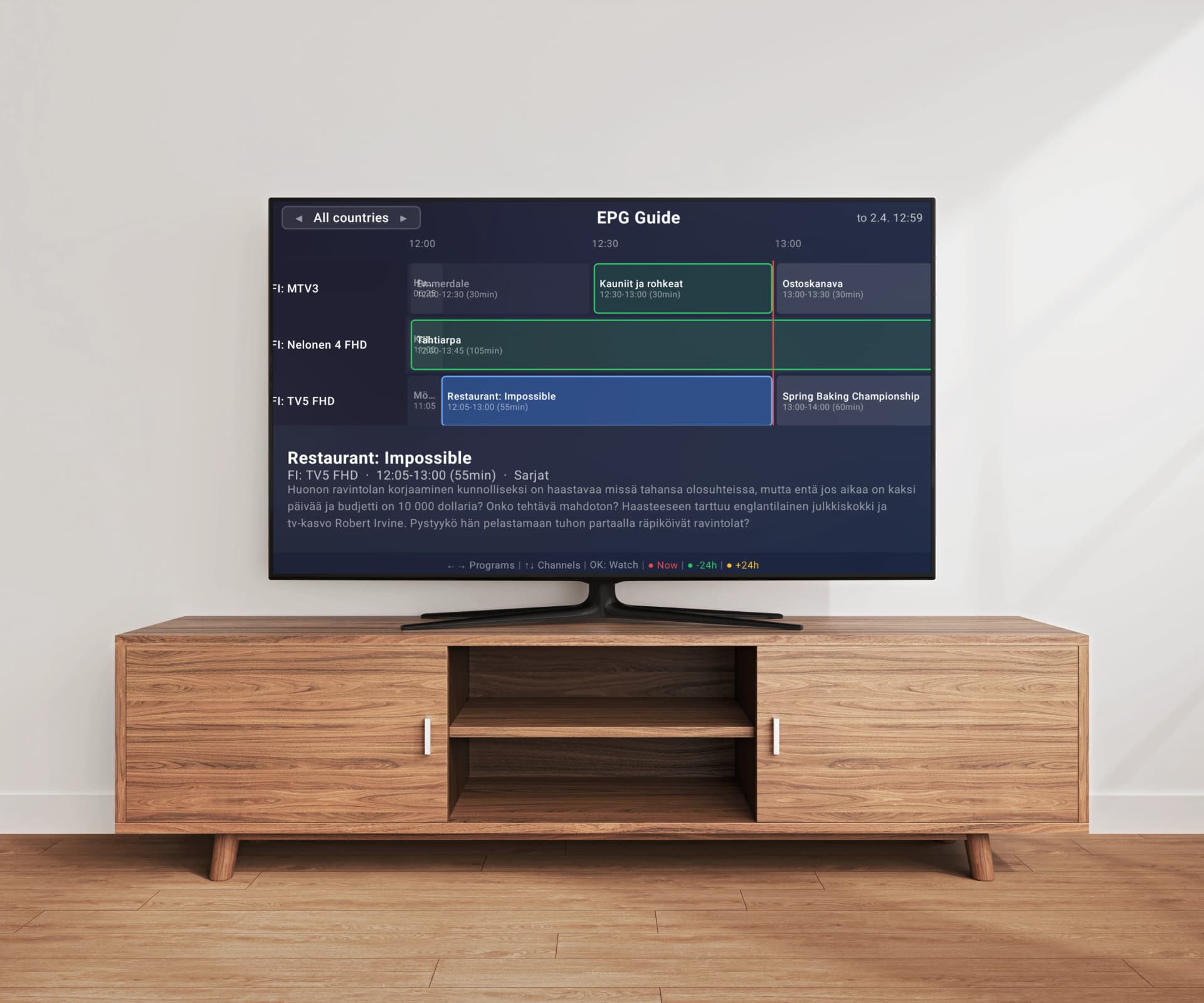
An Electronic Program Guide (EPG) transforms your IPTV experience from a simple channel list into something that feels like a professional cable TV service. Instead of blindly switching between channels, you can see what is currently playing, browse upcoming programs, and plan your viewing. However, EPG setup can be confusing — different formats, mismatched channels, wrong time zones, and mysterious loading failures frustrate many users. In this comprehensive guide, we will explain exactly how EPG works with IPTV, break down the XMLTV format, walk you through setup and troubleshooting, and show why server-side EPG processing eliminates most of the headaches you might encounter.
What Is EPG and Why Does It Matter?
EPG stands for Electronic Program Guide — it is the on-screen schedule that shows you what is playing now and what is coming up next on each channel. Think of it as the digital equivalent of a TV listings magazine. A good EPG displays the program title, start and end time, description, genre, and sometimes episode information. Without EPG, your IPTV experience is reduced to switching channels blindly and hoping to find something worth watching. With EPG enabled, you can browse the full schedule, see program details at a glance, and navigate your channel list far more efficiently. For users with large playlists containing thousands of channels, EPG becomes even more valuable because it helps you quickly identify what is worth watching across a vast selection.
How EPG Works with IPTV
Unlike traditional cable TV where the EPG is embedded in the broadcast signal, IPTV EPG is delivered as a separate data file that your player downloads and matches to your channels. Your IPTV provider or a third-party EPG source hosts an XML file containing program schedules for hundreds or thousands of channels. Your IPTV player downloads this file, parses it, and attempts to match each EPG entry to the corresponding channel in your M3U playlist. The matching is done using identifiers — your M3U file contains a tvg-id attribute for each channel, and the EPG file contains the same identifier for its program listings. When the IDs match, the program guide appears for that channel. If the IDs do not match, the channel will have no EPG data even though the schedules exist in the file. This matching process is where most EPG problems originate.
XMLTV Format Explained
XMLTV is the standard format used to distribute EPG data for IPTV. It is an XML-based file format that contains two main sections: channel definitions and program listings. The channel section defines each channel with an ID, display name, and optional icon URL. The program section contains individual entries with a start time, stop time, channel reference, title, description, and optional metadata like categories, episode numbers, and ratings. XMLTV files can be quite large — an EPG covering thousands of channels with a week of programming can easily exceed 500 MB when uncompressed. For this reason, most EPG providers distribute their files in gzip-compressed format (.xml.gz), which typically reduces the file size by 90% or more. Your IPTV player needs to download, decompress, and parse this entire file to display program information.
Where to Find EPG URLs for Your Provider
The first place to look for your EPG URL is your IPTV provider. Most providers include an EPG URL along with your M3U playlist URL, often in the welcome email or your account dashboard. Some providers embed the EPG URL directly in the M3U file header using the url-tvg attribute, which allows compatible players to detect it automatically. If your provider does not offer a dedicated EPG URL, several community-maintained EPG sources aggregate program data for popular channels worldwide. These include projects hosted on GitHub that compile XMLTV data from public broadcasting schedules. Keep in mind that community EPG sources may not cover all channels in your playlist, especially regional or niche channels. For the best results, always try your provider's EPG URL first, as it will be specifically designed to match their channel identifiers.
Setting Up EPG in Your IPTV Player
In most IPTV players, EPG setup requires you to manually enter the XMLTV URL in the app settings and wait for the data to download and process. This can take several minutes depending on the file size and your internet connection. Some players require you to manually trigger an EPG update, while others refresh on a schedule. Easy IP TV takes a fundamentally different approach — it detects your EPG data automatically. When you add your M3U playlist URL, Easy IP TV's server reads the url-tvg header from your M3U file and processes the EPG data on our servers, not on your TV. If your M3U includes a valid EPG URL, the program guide will appear automatically without any configuration. This eliminates the manual setup step entirely and avoids the performance problems that occur when a Smart TV tries to download and parse a large XMLTV file locally.
Common EPG Problems and How to Fix Them
The most common EPG issue is channels showing no program data. This usually means the tvg-id in your M3U playlist does not match the channel ID in the XMLTV file. Check your M3U file for the tvg-id attribute and compare it with the channel IDs in the EPG source — they must match exactly, including capitalization. Wrong program times are another frequent problem, typically caused by timezone mismatches. XMLTV files specify times in UTC with an offset (e.g., +0200), but if your player does not handle the conversion correctly, schedules will appear shifted by several hours. EPG not loading at all often indicates a connectivity issue — the XMLTV URL may be down, rate-limited, or blocked. Try opening the URL directly in a web browser to verify it is accessible. Incomplete EPG data, where only some channels have listings, usually means the EPG source does not cover all the channels in your playlist. This is especially common with very large playlists or niche regional channels.
EPG Refresh and Scheduling
EPG data is not static — program schedules change, and new listings are added daily. Most XMLTV sources update their data every 12 to 24 hours, so your IPTV player needs to re-download the file regularly to stay current. How often your player refreshes EPG depends on the app. Some players let you set a refresh interval, while others update only at startup or when you manually trigger it. Frequent refresh intervals (e.g., every 6 hours) ensure your guide stays accurate but consume more bandwidth and processing power on your device. For Smart TVs with limited resources, frequent large XMLTV downloads can cause slowdowns or even crashes. The ideal approach is to offload EPG refreshing to a server that handles the download, parsing, and matching centrally. This way, your TV receives only the processed, relevant EPG data without the overhead of handling massive XML files.
Why Server-Side EPG Matching Is Superior
Traditional IPTV players handle EPG entirely on the client device — your TV downloads the XMLTV file, parses the XML, and tries to match channels. This approach has serious limitations. Smart TVs have limited RAM and processing power, so parsing a 500 MB XML file can take minutes and may crash the app entirely. Client-side matching relies on exact ID matches, so even small discrepancies between your M3U tvg-id and the EPG channel ID result in missing program data. Easy IP TV moves all of this processing to our servers. We download and parse the XMLTV file on powerful server hardware, perform intelligent channel matching that goes beyond simple ID comparison, and deliver only the relevant EPG data to your TV in an optimized format. The result is that your program guide loads instantly, matches more channels accurately, and never causes performance issues on your device — even if your playlist has over 200,000 channels with a correspondingly massive EPG file.
FAQ
What is the difference between EPG and XMLTV?
EPG (Electronic Program Guide) is the concept — the on-screen TV schedule showing what is playing now and next. XMLTV is the file format used to deliver that schedule data. Think of EPG as the feature you see on screen, and XMLTV as the technical format that carries the program data from the source to your IPTV player. Almost all IPTV EPG data is distributed in XMLTV format.
Why does my EPG show wrong times for programs?
Wrong EPG times are almost always caused by timezone handling issues. XMLTV files include timezone offsets in their timestamps, but some IPTV players do not process these correctly. First, make sure your TV or device timezone is set correctly. If times are consistently off by a fixed number of hours, your player may be ignoring the UTC offset in the XMLTV data. Server-side EPG processing, like Easy IP TV uses, handles timezone conversion centrally and delivers correctly timed data to your device.
How often should EPG data be refreshed?
Most EPG sources update every 12 to 24 hours, so refreshing once or twice per day is sufficient for most users. More frequent refreshes waste bandwidth without providing fresher data. If your player supports scheduled refresh, set it for a time when you are not watching — like early morning. Easy IP TV handles EPG refreshing automatically on our servers, so your TV always has up-to-date program data without you needing to configure anything.
My EPG works for some channels but not others. Why?
This typically means the EPG source does not include data for all channels in your playlist, or the channel identifiers (tvg-id) do not match between your M3U file and the XMLTV source. Large playlists with tens of thousands of channels will rarely have complete EPG coverage from a single source. Some channels, especially regional or niche ones, may not be covered by any publicly available EPG. Your IPTV provider's EPG URL usually has the best coverage for their specific channel lineup.
Does Easy IP TV require manual EPG setup?
No. Easy IP TV automatically detects EPG data from the url-tvg header in your M3U playlist and processes it on our servers. If your M3U file includes a valid EPG URL, the program guide appears automatically with no configuration needed. This server-side approach also means your Smart TV does not have to download or parse large XMLTV files, resulting in faster performance and more reliable EPG matching.
Related articles
How to Set Up an M3U Playlist on Your Smart TV
A complete beginner's guide to M3U playlists: what they are, where to get one, and how to set it up on Samsung, LG, or Android TV step by step.
What is IPTV? Complete Beginner's Guide (2026)
IPTV has transformed how millions of people watch television, but the technology and terminology can be confusing for newcomers. This comprehensive guide explains everything you need to know about IPTV in plain language — from how the technology works to how to set it up on your own TV.
Best IPTV Player for Smart TV 2026 — Which One Fits Your TV?
Which is the best IPTV player for Smart TV in 2026? We compare the top apps for Samsung, LG, and Android TV — and show which IPTV app is the right match for your television.
Best IPTV Player for Android TV & Google TV 2026
Which is the best IPTV player for Android TV in 2026? We compare the top 5 IPTV apps for Android TV and Google TV — Easy IP TV, TiviMate, IPTV Smarters Pro, OTT Navigator, and SmartOne IPTV — to help you find the right app for your TV.
Get Automatic EPG Without the Hassle
Easy IP TV detects and processes your EPG data server-side, so your program guide just works — no manual setup, no wrong times, no TV lag. Available on Samsung, LG, and Android TV with a free 24-hour trial.
Try Easy IP TV Free