
Home › Blog › IPTV kijken op je Smart TV: een gids in eenvoudige taal
IPTV kijken op je Smart TV: een gids in eenvoudige taal
May 5, 2026
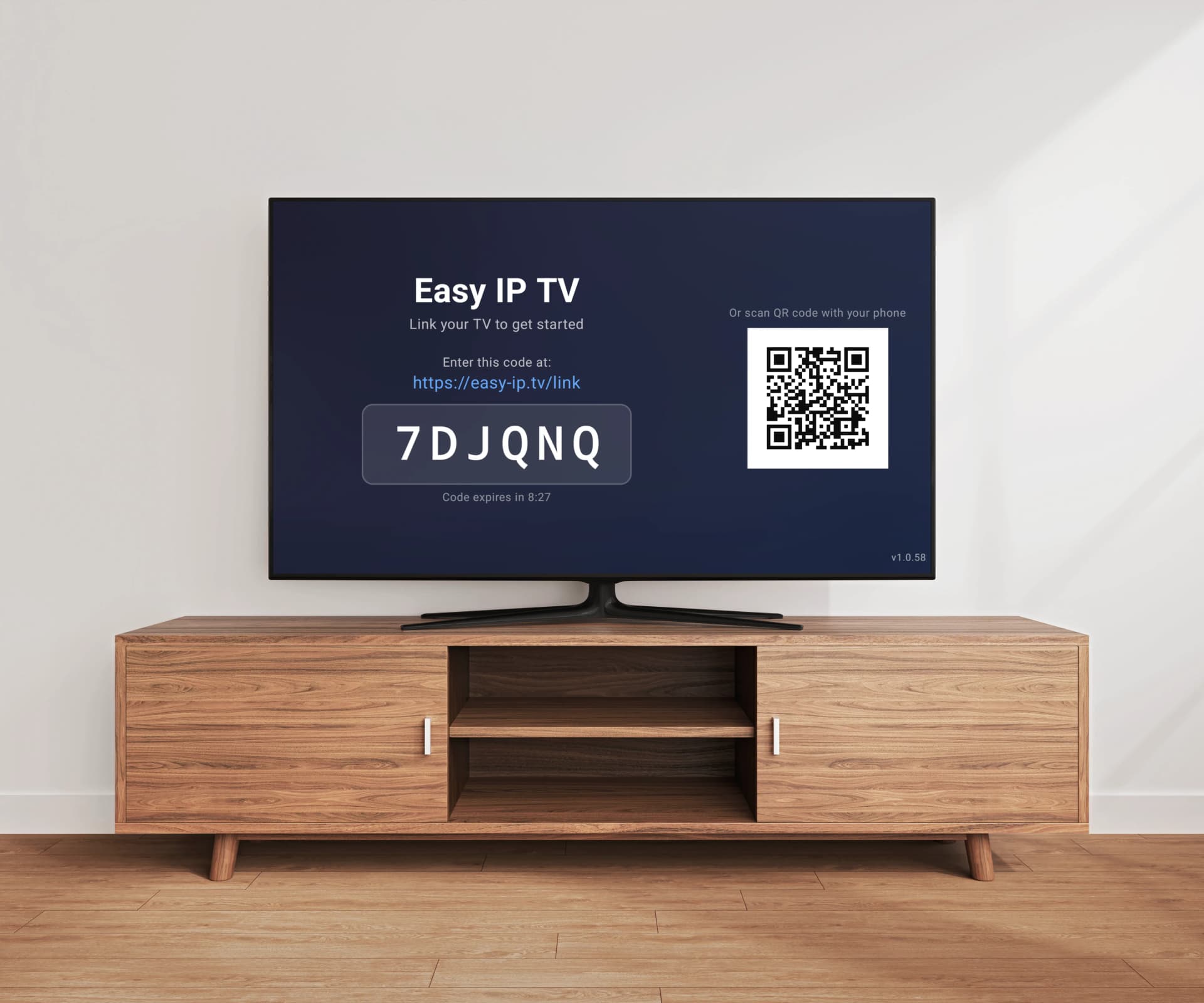
"IPTV" is een van die woorden die in technische artikelen rondzwerven zonder dat iemand even stilstaat om het uit te leggen. Als je een Smart TV hebt (een televisie van de afgelopen jaren die verbinding maakt met internet) en je het woord "IPTV" hebt gehoord maar niet helemaal zeker weet wat het betekent of of het iets voor jou is, dan is dit artikel voor jou geschreven. Geen vakjargon. Geen aannames. Gewoon een heldere uitleg, geschreven in eenvoudige taal.
Wat IPTV eigenlijk betekent
IPTV staat voor "Internet Protocol Television". Dat is een lange uitdrukking, maar het idee is simpel: het is televisie die via je internetverbinding thuis bij je komt, in plaats van via een kabel in de muur of een schotelantenne op het dak. Misschien gebruik je al Netflix, YouTube of Disney+. Dat is ook televisie via het internet. IPTV is hetzelfde idee, alleen richt het zich op live tv-zenders — het soort dat je via de kabel kijkt, waar het programma plaatsvindt op hetzelfde moment dat je kijkt. Een voetbalwedstrijd. Een nieuwsuitzending. Een ochtendprogramma uit jouw land. Daar gaat IPTV doorgaans over.
Wat je nodig hebt (en wat niet)
Je hebt drie dingen nodig, en dat is het. Ten eerste, een Smart TV. De meeste televisies die in de afgelopen zeven of acht jaar zijn verkocht, zijn Smart TV's — ze hebben apps en kunnen verbinding maken met je wifi thuis. Als die van jou van Samsung, LG, Sony, TCL of Hisense is, of als er "Android TV" of "Google TV" op de doos staat, is het vrijwel zeker een Smart TV. Ten tweede, een internetverbinding thuis. Dezelfde die je gebruikt om een recept op te zoeken of een e-mail te versturen. Hoe sneller de verbinding, hoe beter het beeld, maar een gewone thuisverbinding (5 tot 10 megabit per seconde) is genoeg om tv te kijken in goede kwaliteit. Ten derde, een IPTV-abonnement. Dat is het deel dat je daadwerkelijke zenders geeft om te bekijken. Wij zijn niet degene die dat leveren — wij zijn de spelerapp, vergelijkbaar met hoe een dvd-speler niet de mensen zijn die de dvd's maken. Je kiest het IPTV-abonnement los van de spelerapp, op dezelfde manier als je je telefoonprovider kiest los van je telefoon. Wat je niet nodig hebt: een kabel, een schotel, een set-top box of iets anders van een installateur. De tv en het internet die je al hebt, zijn voldoende.
De twee onderdelen — een speler en een aanbieder
Dit is het belangrijkste punt van het hele artikel, dus we besteden er een moment aan. IPTV kijken bestaat uit twee onderdelen. Het eerste deel is de speler. Dat is de app op je tv die de zenders weergeeft — het beeld dat je ziet, de zenderlijst, de programmagids. Easy IP TV is een speler. Andere voorbeelden zijn VLC en de ingebouwde mediaspelers op je tv. Het tweede deel is de contentaanbieder. Dat is het bedrijf dat je toegang geeft tot de echte tv-zenders. Zij verkopen je een abonnement, en in ruil daarvoor geven ze je een lang internetadres (een M3U-URL genoemd) dat naar je zenders verwijst. De speler op zichzelf heeft geen zenders. De contentaanbieder is waar de zenders vandaan komen. Je hebt beide nodig. Beschouw de speler als een waterkoker en het IPTV-abonnement als de thee. Je hebt beide nodig om een kopje thee te hebben, en ze komen uit verschillende winkels.
Hoe het echt werkt
Zodra je je IPTV-abonnement en de M3U-URL van de aanbieder hebt, duurt de rest ongeveer twee minuten. Stap één. Open op je Smart TV de app store. Op een Samsung-tv is dat Samsung Apps. Op een LG-tv is het de LG Content Store. Op een Android TV is het de Google Play Store. Zoek naar Easy IP TV en installeer het. Net zoals je een andere app zou installeren. Stap twee. Open de app op je tv. Het scherm toont een code van zes tekens. Schrijf hem op of maak er een foto van met je telefoon — je hebt hem zo nodig. Stap drie. Ga op je telefoon, tablet of computer naar easy-ip.tv. Er wordt om een e-mailadres gevraagd (zodat we je een inloglink kunnen sturen zonder dat je een wachtwoord hoeft te onthouden) en de code van zes tekens van je tv. Daarmee verbind je je tv met je account. Stap vier. Wanneer je bent ingelogd, plak je de M3U-URL van je IPTV-aanbieder in het vak op de website. Je zenders verschijnen binnen één à twee minuten op je tv. Dat is alles.
Veelgehoorde zorgen
Is dit legaal? De spelerapp — Easy IP TV — is volledig legaal, op dezelfde manier als VLC en Windows Media Player legaal zijn. Het zijn mediaspelers. De legaliteit van wat je via de speler bekijkt, hangt af van of de IPTV-aanbieder die je hebt gekozen het recht heeft om die zenders te verspreiden. Als je twijfelt over een bepaalde aanbieder, vraag dan of zij de juiste licenties hebben voor de zenders die ze aanbieden. Als ze geen helder antwoord kunnen geven, is dat een teken om voorzichtig te zijn. Bewaren jullie mijn creditcardgegevens voor altijd? We bewaren je kaartgegevens helemaal niet. Betaling loopt via PayPal, dezelfde dienst die veel mensen gebruiken om geld naar familie te sturen. Je kunt op elk moment opzeggen, en de volgende factureringsperiode komt er simpelweg niet. Wat als ik vastloop? Stuur ons een e-mail naar info@easy-ip.tv. We zijn een klein team in Finland, en een echt mens leest je bericht en antwoordt. We hebben geen telefoonlijn omdat we te klein zijn om die te bemannen, maar e-mailantwoorden komen meestal binnen een dag. Wat als het niet werkt op mijn specifieke tv? Er is een gratis 24-uurs proefperiode zonder creditcard. Je kunt de app installeren, hem proberen met je lijst en zelf zien voordat er geld van eigenaar wisselt. Als de app niet werkt op je tv — bijvoorbeeld omdat je tv ouder is dan tien jaar en geen software-updates meer krijgt — heb je niets verloren.
Een klein woordenlijstje
Een paar korte definities voor het geval je deze woorden elders tegenkomt. M3U: een internetadres dat je IPTV-aanbieder je geeft en dat naar je tv-zenders verwijst. Je plakt het in de speler. Dat is zijn enige taak. EPG: kort voor "Electronic Programme Guide" (elektronische programmagids). De lijst met programma's voor elke zender, zoals de gedrukte tv-gidsen in kranten, maar op je scherm. Sommige IPTV-abonnementen bevatten dit; andere niet. HD en 4K: niveaus van beeldscherpte. HD ziet er goed uit. 4K (soms Ultra HD genoemd) ziet er nog scherper uit. De beeldscherpte hangt af van wat de zender uitzendt — de speler toont alleen wat hij ontvangt. Buffering: wanneer het beeld een paar seconden pauzeert omdat de internetverbinding even traag is. Dit is de meest voorkomende reden waarom een stream niet soepel afspeelt. Een bekabelde internetkabel van de router naar de tv lost dit meestal op. Wifi is handig, maar een kabel is betrouwbaarder. Smart TV: elke moderne televisie met apps die zelf verbinding kan maken met internet. Als je op een Home-knop op de afstandsbediening kunt drukken en apps zoals YouTube of Netflix ziet, heb je een Smart TV.
Wanneer iets niet werkt
Het beeld hapert of pauzeert. Bijna altijd een probleem met de internetverbinding. Probeer de tv met een Ethernet-kabel aan de router te verbinden, dat is de kabel met de brede stekker die op een telefoonstekker lijkt. Kabels zijn voor video veel betrouwbaarder dan wifi. Je ziet helemaal geen zenders. Meest voorkomende reden: de M3U-URL is verkeerd ingetypt, of je IPTV-abonnement is verlopen. Controleer de URL zorgvuldig en vraag je IPTV-aanbieder of je abonnement nog actief is. De programmagids is leeg. De IPTV-aanbieder bevat soms geen programmagids, of die staat in een aparte URL. De zenders zelf spelen wel; alleen de programmalijst ontbreekt. Vraag je aanbieder om de EPG-URL als je wilt dat de programmagids gevuld wordt. Je bent vergeten de code van zes tekens op te schrijven. Open de app opnieuw op de tv — er is een knop om de code opnieuw te tonen of een nieuwe te maken.
Waar kun je om hulp vragen
Je hoeft niet het gevoel te hebben dat je ons stoort. We zijn een klein Fins bedrijf, we zijn blij wanneer onze klanten ons schrijven en we lezen elk bericht. Het adres is info@easy-ip.tv. Vertel ons wat je hebt geprobeerd en wat er gebeurde, dan reageren we met de volgende stap.
FAQ
Moet ik technisch zijn om IPTV te gebruiken?
Nee. Je moet een app op je Smart TV kunnen installeren (op dezelfde manier als je Netflix of YouTube zou installeren), en je moet een lang internetadres kunnen typen of plakken in een vak op een website. Dat is het meest technische deel van het hele proces. Als je e-mail en een smartphone kunt gebruiken, kun je dit.
Zijn jullie hetzelfde als de IPTV-zenders zelf?
Nee. Wij zijn de speler — de app die de zenders op je tv toont. De zenders zelf komen van een apart bedrijf, een IPTV-aanbieder, die je zelf kiest en apart betaalt. We hebben geen connectie met een specifieke aanbieder, we raden geen enkele aan, en we verkopen geen zenders.
Belasten jullie mijn kaart zonder dat ik het weet?
Nee. Betaling is per maand, je kunt op je accountpagina op elk moment opzeggen, en we gebruiken PayPal, dus we zien of bewaren je kaartgegevens nooit. Opzeggen stopt de volgende afschrijving — het onderbreekt niet de tijd die je al betaald hebt.
Ik heb geen creditcard. Kan ik dit toch proberen?
De gratis 24-uurs proefperiode vereist helemaal geen creditcard. Na de proefperiode gebruiken de betaalde abonnementen PayPal, dat afhankelijk van je land kan worden betaald met een kaart of rechtstreeks vanaf een bankrekening.
Werkt het op een tv uit 2014?
Dat hangt af van het model van de tv en of die nog software-updates ontvangt. Probeer eerst de gratis proefperiode. Als de app weigert te installeren of het beeld kapot is, is je tv waarschijnlijk te oud. Je hebt niets verloren — de proefperiode is gratis.
Mijn Engels is niet zo goed. Begrijp ik de app wel?
De app is vertaald in vele talen, waaronder Spaans, Portugees, Frans, Duits, Arabisch, Hindi, Koreaans en andere. Kies je taal in de instellingen en de menu's staan in jouw taal.
Is het legaal waar ik woon?
De app zelf is overal legaal — het is een mediaspeler, zoals VLC. De legaliteit van de IPTV-zenders hangt af van de aanbieder die je kiest. Als je twijfelt, vraag dan aan de aanbieder of hij de juiste licenties heeft voor de zenders die hij verspreidt. Betrouwbare aanbieders kunnen dit duidelijk beantwoorden; zij die dat niet kunnen, vormen een waarschuwingssignaal.
Gerelateerde artikelen
Wat is IPTV? Complete beginnersgids (2026)
IPTV heeft de manier waarop miljoenen mensen televisie kijken volledig veranderd, maar de techniek en terminologie kunnen voor nieuwkomers verwarrend zijn. Deze uitgebreide gids legt in begrijpelijke taal alles uit wat je over IPTV moet weten — van hoe de technologie werkt tot hoe je het op je eigen TV instelt.
Hoe stel je een M3U-afspeellijst in op je Smart TV
Een complete beginnersgids voor M3U-afspeellijsten: wat ze zijn, waar je er een krijgt en hoe je ze stap voor stap instelt op Samsung, LG of Android TV.
Is IPTV legaal? Wat je moet weten in 2026
IPTV-technologie zelf is volkomen legaal — het is gewoon video die via het internet wordt geleverd. Maar de vraag of het legaal is, ligt genuanceerder dan een simpel ja of nee. Het verschil begrijpen tussen de technologie, de content en de player-app is essentieel voor elke IPTV-gebruiker in 2026.
IPTV EPG-gids: installatie, XMLTV en probleemoplossing
Alles wat je moet weten over Electronic Program Guides voor IPTV. Van het begrijpen van het XMLTV-formaat tot het oplossen van veelvoorkomende EPG-problemen: deze gids behandelt installatie, probleemoplossing en waarom server-side EPG-matching een betere ervaring biedt.
Probeer Easy IP TV 24 uur gratis
Geen creditcard. Geen lange aanmelding. Installeer de app, plak je M3U-URL en kijk.
Start de gratis proefperiode