
IPTV on your Samsung, LG or Android TV
Paste your M3U playlist URL on the website — your TV starts playing. Server-side processing means instant loading, no lag, even with 200,000+ channels. Free 24h trial.
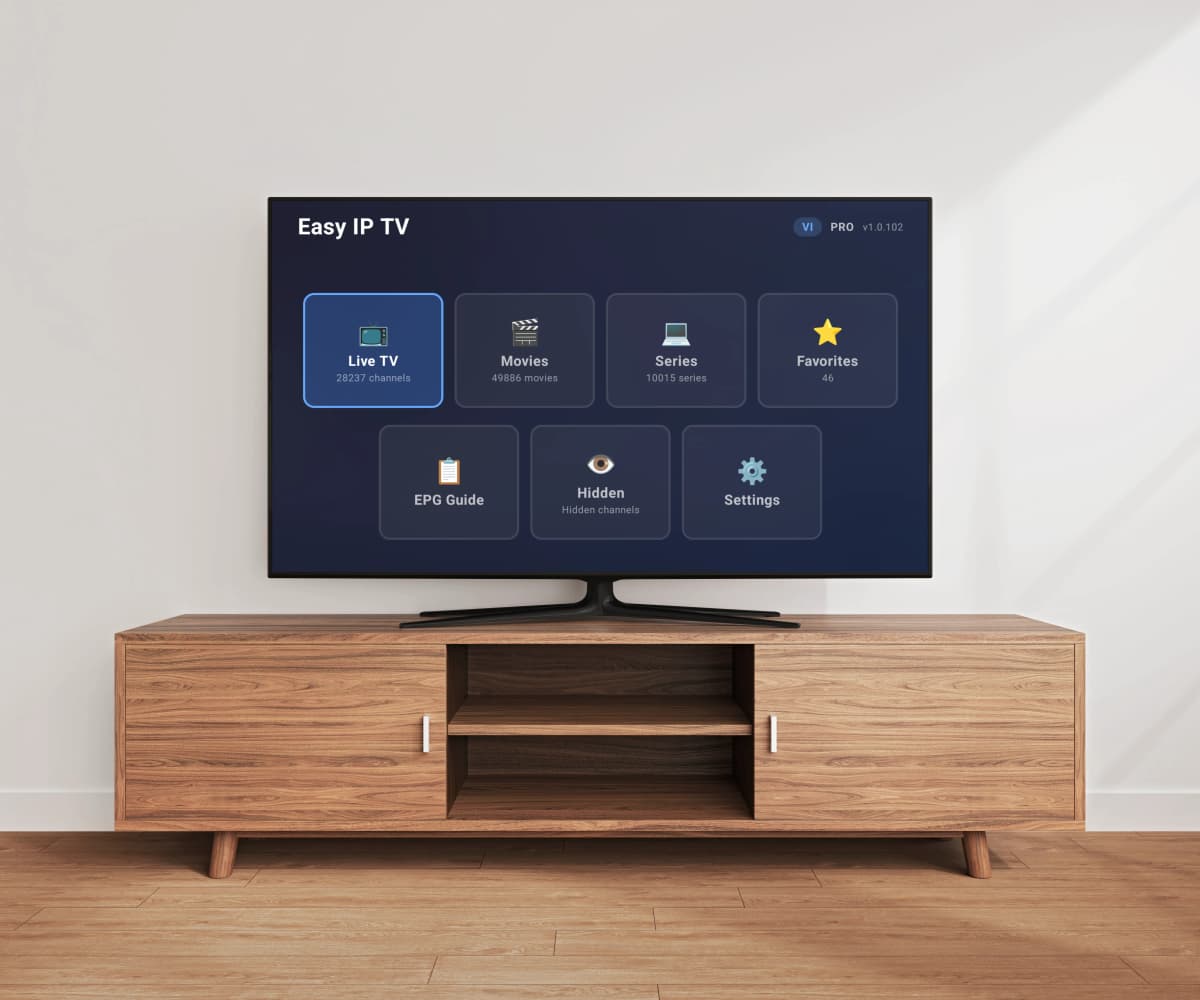

How it works
Install on your TV
Download Easy IP TV from your TV's app store.
Link with a code
Enter the code shown on your TV screen to connect it to your account.
Add your M3U playlist
Paste your IPTV provider's M3U URL and start watching live TV.
See it in action
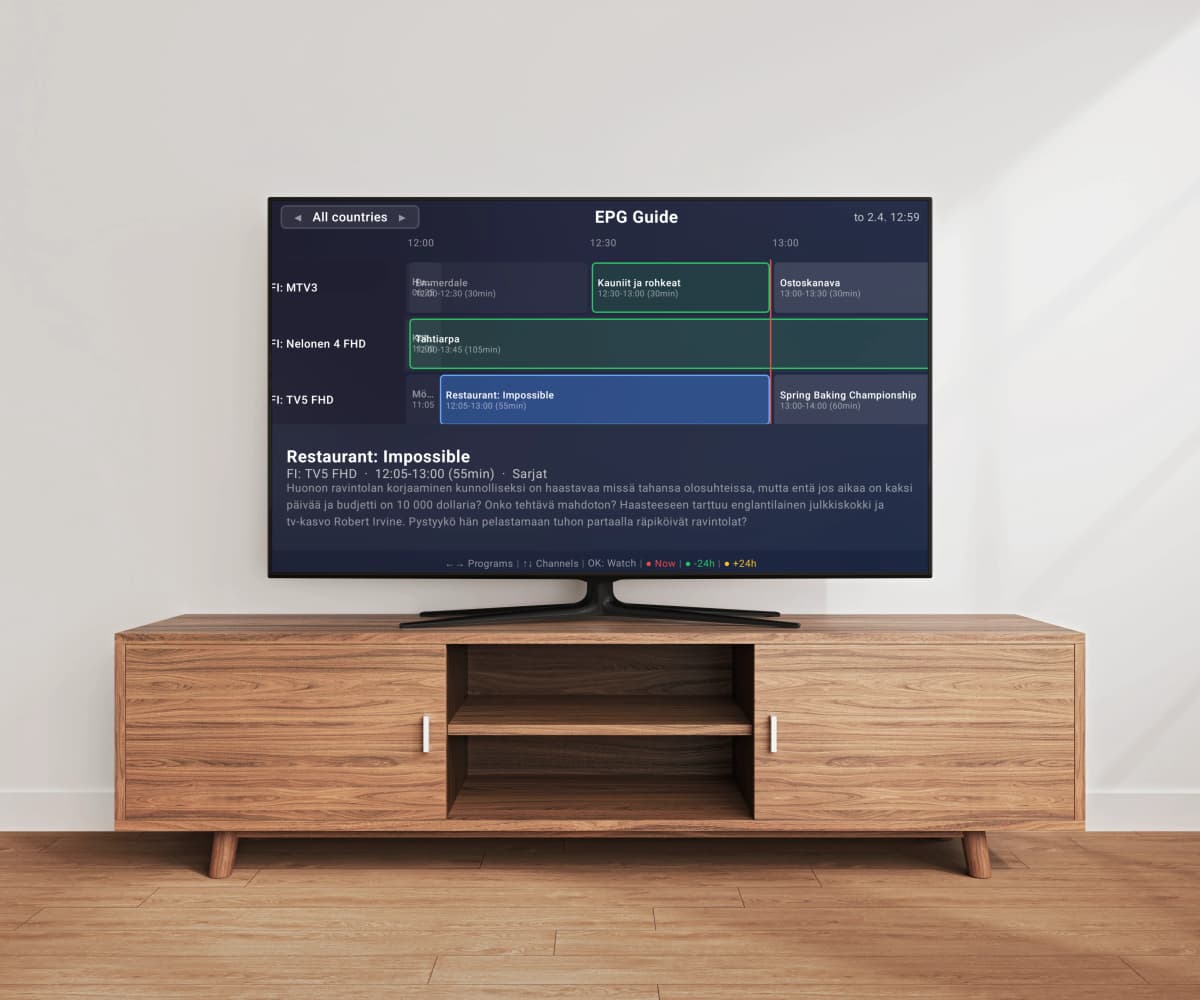
Live TV with program guide
Browse channels with logos, EPG program data, and live stream preview. Search across thousands of channels instantly.
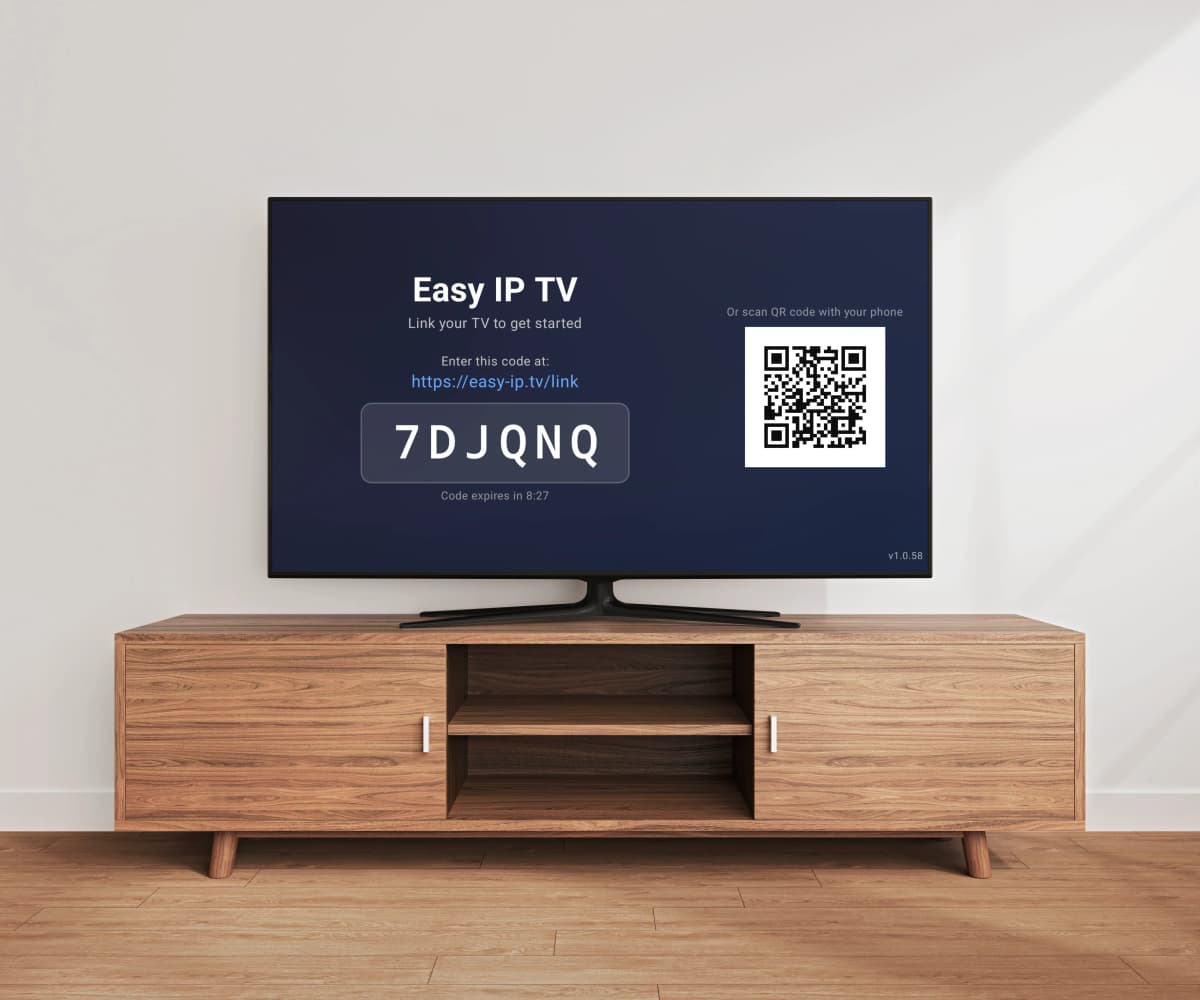
Connect in seconds
Enter a 6-digit code or scan the QR code to link your TV. No accounts to create on the TV — everything is managed from your phone or computer.
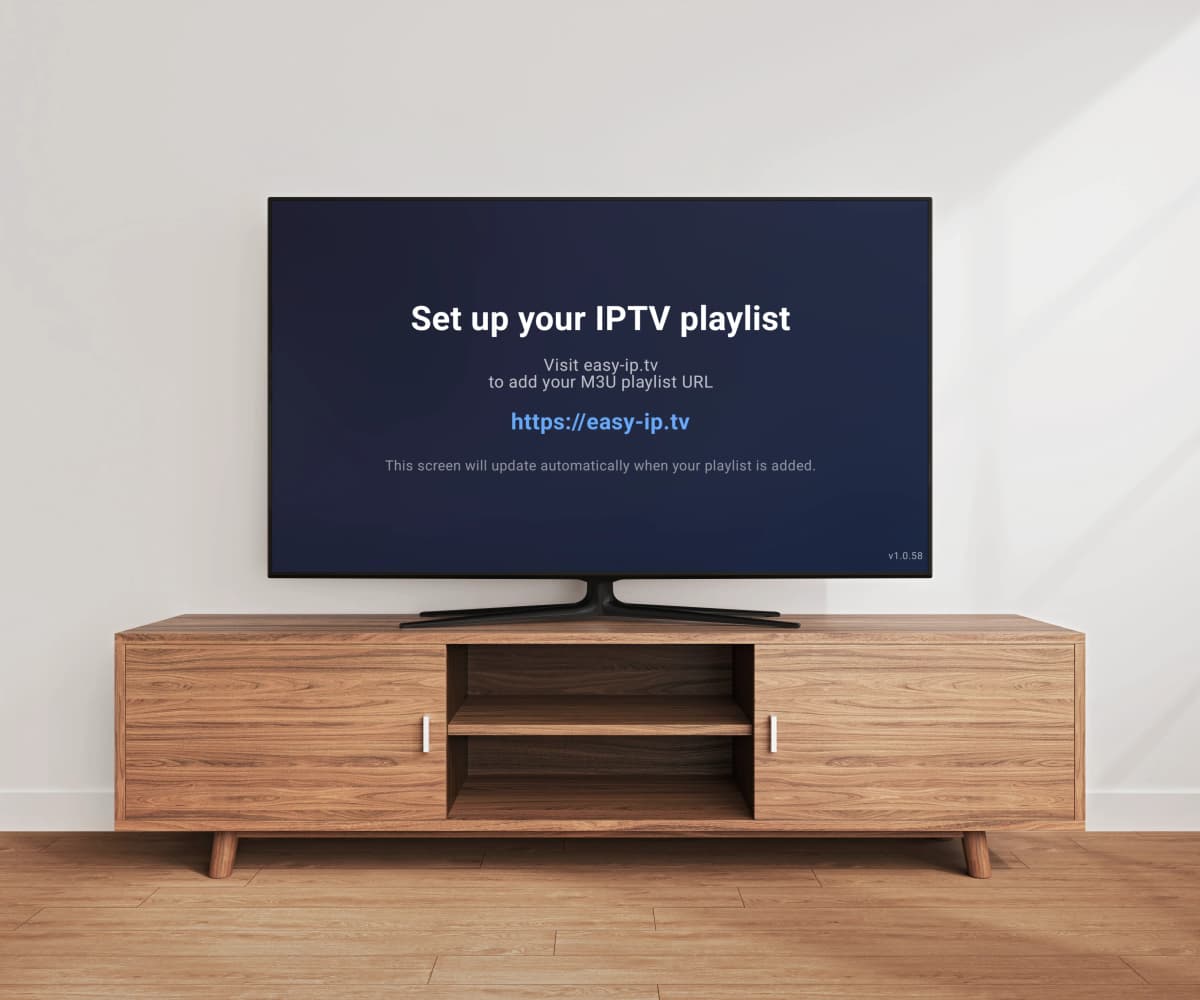
Easy playlist setup
Just paste your M3U playlist URL on the website. Your TV updates automatically — no USB drives, no file transfers.
Full EPG program guide
View the full electronic program guide with a timeline grid. See what's on now and next across all your channels.
Built for Smart TV performance
Most IPTV players process large M3U playlists directly on your TV — causing slow loading and lag on limited Smart TV hardware. Easy IP TV takes a different approach.
Server-side processing
Your playlist is processed and optimized on our servers. Your TV only receives the ready channel structure — no heavy parsing on the TV.
Faster loading
Channels appear quickly because the heavy lifting is already done. No waiting for your TV to parse a large playlist file.
Instant search
Search across thousands of channels smoothly — powered by server-side indexing, not TV hardware.
Optimized for large playlists
Whether you have 500 or 200,000 channels, performance stays the same — because processing happens on the server.
Plans
Frequently Asked Questions
What is Easy IP TV?
Easy IP TV is a premium IPTV player for Smart TVs. It plays M3U playlists on LG webOS, Samsung Tizen and Android TV / Google TV. Set up in under 2 minutes — install the app, link your TV with a code, paste your M3U URL, and you're watching. We do not provide, host, or distribute any content — you bring your own playlist from your IPTV provider.
How do I set up Easy IP TV?
1) Install Easy IP TV from your TV's app store (LG Content Store, Samsung Apps, or Google Play). 2) Open the app — a 6-digit code appears on screen. 3) Visit easy-ip.tv on your phone or computer and enter the code. 4) Paste your M3U playlist URL in the dashboard. Your playlist will be processed and channels will appear on your TV — small playlists load quickly, larger ones may take a few minutes.
Which Smart TVs does Easy IP TV work on?
Easy IP TV works on LG webOS (2018 and newer), Samsung Tizen (2018 and newer), and Android TV / Google TV. It's one of the few IPTV players available on all three major Smart TV platforms. Install it directly from your TV's built-in app store — no sideloading or USB installation needed.
How do I install Easy IP TV on Samsung TV?
Press the Home button on your Samsung remote, open Samsung Apps (or the Apps section), search for "Easy IP TV", and install it. Once installed, open the app and follow the on-screen code to link your TV at easy-ip.tv. Works on all Samsung Smart TVs from 2018 onwards running Tizen OS.
How do I install Easy IP TV on LG TV?
Press the Home button on your LG remote, open the LG Content Store, search for "Easy IP TV", and install it. Open the app, then visit easy-ip.tv on your phone to enter the linking code. Works on all LG Smart TVs from 2018 onwards running webOS. Also supports LG Magic Remote for easy navigation.
How do I install Easy IP TV on Android TV?
Open the Google Play Store on your Android TV or Google TV device, search for "Easy IP TV", and install it. Open the app and link it with the code at easy-ip.tv. Works on all Android TV devices including Sony, TCL, Hisense, Xiaomi, NVIDIA Shield, Chromecast with Google TV, and others.
What is an M3U playlist and how do I get one?
An M3U playlist is a text file containing links to media streams. Your IPTV provider gives you an M3U URL (a web address starting with http:// or https://) that you paste into Easy IP TV. The app downloads the playlist and organizes your channels automatically — including channel names, logos, and group categories. Easy IP TV supports both M3U and M3U8 formats.
Does Easy IP TV support EPG (Electronic Program Guide)?
Yes. Easy IP TV supports XMLTV-format EPG, which shows current and upcoming programs for each channel. Many M3U playlists include EPG data automatically. You can also add a separate EPG URL in your dashboard. The program guide is displayed directly in the player so you always know what's on.
What internet speed do I need for IPTV?
For smooth streaming: 5 Mbps for SD channels, 10 Mbps for HD (720p/1080p), and 25 Mbps for 4K/Ultra HD content. These are per-stream requirements — if multiple TVs stream simultaneously, multiply accordingly. We recommend at least 15 Mbps for a reliable HD experience. A wired Ethernet connection to your TV is always more stable than Wi-Fi.
How do I fix IPTV buffering or freezing?
Common fixes: 1) Use a wired Ethernet connection instead of Wi-Fi — this is the #1 improvement. 2) Check your internet speed (at least 10 Mbps for HD). 3) Try changing your DNS to Google (8.8.8.8) or Cloudflare (1.1.1.1) in your router settings. 4) Close other apps on your TV to free up memory. 5) If your ISP throttles streaming, a VPN may help. Note: buffering is usually caused by the stream source, not the player app.
Why is my EPG (program guide) not showing?
Common causes: 1) Your M3U playlist may not include EPG data — ask your IPTV provider for an EPG/XMLTV URL and add it in your dashboard. 2) Channel IDs in the playlist may not match the EPG source — this is a provider-side issue. 3) Large EPG files can take a few minutes to load after setup. 4) Try refreshing your playlist from the dashboard. Easy IP TV auto-detects EPG from most playlists, but a separate EPG URL often gives better results.
Can I use Easy IP TV on multiple TVs?
Yes. The Basic plan supports 1 TV, and the Pro plan supports up to 3 TVs linked to the same account. All TVs share the same playlist — set it up once in your dashboard and all linked TVs get the same channels. You can link and unlink TVs at any time from your dashboard. Note: some IPTV providers limit the number of simultaneous streams per subscription — check with your provider if you plan to watch on multiple TVs at the same time.
Does Easy IP TV provide TV channels or content?
No. Easy IP TV is a player only — similar to VLC or any video player. We do not provide, host, or distribute any content, playlists, or channel subscriptions. You add your own M3U playlist from your IPTV provider. Users are solely responsible for the content they access and its legality in their jurisdiction.
Is Easy IP TV free?
Easy IP TV offers a free 24-hour trial so you can test it with your playlist — no credit card required. After the trial, choose the Basic plan (1 TV) or Pro plan (up to 3 TVs with automatic playlist refresh). Pricing is adjusted for different regions — see the pricing section above or the billing page for prices in your local currency.
Is my playlist data secure?
Yes. Your M3U and EPG URLs are stored securely on our servers and transmitted over encrypted connections (HTTPS). Video streams go directly from the stream source to your TV — we never relay, proxy, or store any stream content. We do not access, monitor, or share your playlist data with third parties. See our Privacy Policy for full details.
How do I cancel my subscription?
Go to easy-ip.tv, sign in, and navigate to Billing. You can cancel your subscription at any time — cancellation takes effect at the end of your current billing period, so you keep access until then. You can also manage your subscription through the Stripe customer portal. No hidden fees, no cancellation penalties.
Does Easy IP TV work with a VPN?
Easy IP TV works normally whether you use a VPN or not — the app itself does not block or require VPN connections. If you use a VPN, make sure it's configured at the router or device level so your TV's traffic goes through it. Note that some IPTV providers may have their own VPN policies. Stream performance depends on your VPN speed and server location.
Is using Easy IP TV legal?
Easy IP TV is a media player — like VLC or any video player. The app itself is completely legal. We do not provide, host, or distribute any content. Users are responsible for ensuring that the content they access through their own playlists complies with applicable laws in their jurisdiction.
Can I download an IPTV app on my Smart TV?
Yes! You can download IPTV player apps directly from your Smart TV's built-in app store — no USB drives, sideloading, or technical setup required. Easy IP TV is available on Samsung TV (Samsung Apps), LG TV (LG Content Store), and Android TV / Google TV (Google Play Store). Just search for "Easy IP TV", install it, and start watching in under 2 minutes.
Setup Guides
Samsung TV Setup Guide
Step-by-step installation and setup for Samsung Smart TVs (Tizen 2018+)
LG webOS Setup Guide
Step-by-step installation and setup for LG Smart TVs (webOS 2018+)
Android TV Setup Guide
Step-by-step installation and setup for Android TV and Google TV devices
Troubleshooting Guide
Fix buffering, EPG issues, and get the best streaming experience